Tag: security

  • Which Password Manager is Right for My Devices and Digital Lifestyle?

    Which Password Manager is Right for My Devices and Digital Lifestyle?

    In my blog post here: How to Manage Your Passwords, I recommend using a password manager and I give a few suggestions for programs based on what my clients are using.

    Which password manager is best for you and what is the difference between them?
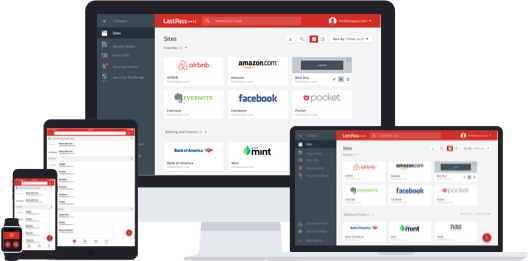
    LastPass Password ManagerI use LastPass because I have multiple types of device – Windows, Mac, Android, and iOS. Since LastPass is a browser plugin for Windows & Mac and an app for Android & iOS, I can use it on all of those devices and it syncs the password vault between them through the cloud. LastPass also has many advanced features such as online shopping profiles, form fill, password generation, and security checks.

    You may have a similar mix of devices, or a subset, or you may be all Apple. You may also not be a very savvy technology user and want something easier to use.
    iCloud Keychain Password ManagerFor my clients on Apple devices and Apple software only (Safari browser), I typically advise to just enable iCloud Keychain and not worry about another password manager (as long as they’re using a strong, unique iCloud password and change it regularly). Some prefer 1Password, which, after an initial investment in the software program, works pretty well for them.


    Dashlane Password Manager

    If you want a password manager just for your desktop computer, and you don’t care about syncing with other devices, then Dashlane has a nice user interface, may be easier to use for you, and it’s free for one device.


    If you watch Shark Tank, you may remember seeing a team pitching for funding for a program called Splikity. The software and service were developed to be easier to use for novices. If you’re struggling with your current password manager or if you’re just jumping in and you want something simple and basic, you may want to give it a try. Like LastPass, Splikity is a browser plugin and iOS app, but is not available on Android.

    LastPass is free for the browser plugin but $12/year to sync with the mobile apps. You’ll pay $49.99 for 1Password (only recommended for Apple devices, and you’ll need a Dropbox account for syncing). Splikity’s service is $4.99/month.

    Need help with passwords?

    Contact Me

  • How Do I Know if my Cloud Storage is Secure?

    How Do I Know if my Cloud Storage is Secure?

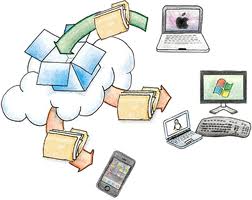
    cloud storageI am a big fan of cloud storage services. It’s magic to me, the way that the photos that I take with my cell phone appear on my PC when I get home, without having to plug anything in. And to have all of my work from my desktop PC available to me on my laptop.

    My data is available to me alone unless I choose to share it with someone. Most cloud services encrypt the data during transfer to/from the Internet (“SSL” encryption – you’ll know it’s encrypted because of the “s” in “https”), and then again when it’s stored on their servers. So if a hacker gets into their servers, unless they can crack the encryption, my data is still private.

    The main risk is if my password gets compromised. Then anyone with my user id and password could access all of my data. If you’re concerned about cloud security, then it’s important to have a strong password, and to change it often.

    strong passwordYou’ve probably heard that term before, but what does “strong” password mean? How long does it need to be? Do you need special characters? Numbers? How many? Do you need a different password for every cloud service? How do you remember all of those passwords?

    It’s a complex subject. And unfortunately, the recommendations for “strong” passwords keep changing, as the hackers become more sophisticated.

    I recommend using a password manager. Let the experts worry about it. A password manager is a plug-in for your web browser. You can use it to generate a password and it will indicate how “strong” that password is. Once you use that password to log into your cloud service through your web browser, then you can store that password in your “password vault” that the plug-in supplies.

    The password manager is itself a cloud service, so you need a password for it. But it’s the only password that you really need to remember for all of your cloud services. I start with a word that has some personal meaning to me, add a character between syllables, a few numbers at the end (that I’m sure that I’ll remember), and then use the word in a complete phrase.

    Password managers use a extra level of security for their cloud service. Your password vault gets encrypted locally, on your own computer, and then transferred and stored on the cloud server. When you log into the service through your web browser plugin, the reverse process happens – the password vault is transferred from the cloud down to your PC, and then decrypted.

    LastPass Logo

    I use LastPass as my password manager. Other people that I know have recommended OnePassword, which works similarly.

    I believe that you can relax about your cloud security if you use a password manager and if you change your passwords regularly. The convenience of using a cloud service far surpassing the slight risk of having your privacy compromised. However I do not use cloud services for financial data, nor do I store my passwords for financial sites in my password manager. I suspect that it would be fine to do so, but I’m just not quite willing to risk it…

    If you need help setting up your cloud service or password manager, Digital Chaos Control can help! Contact us today.