

Tag: research

  • Three reasons to use Evernote for Team Collaboration

    Three reasons to use Evernote for Team Collaboration

    Evernote for Business

    Evernote is a great organization system because you can organize your notes, documents, photos, and emails all in one place.

    As an Evernote user, you have the option of sharing notes and notebooks with others. But for true collaboration with team members that gives you a shared work space, admin controls, and more, you need the Evernote for Business plan.

    Your team members can add research notes, to-dos, points for follow-up, web clippings, etc. Members can initiate chat sessions for team discussions. (Work chat allows your team to cut back on email discussions, gets them chatting in real time, and helps to get them focused on the task at hand).

    Here are the advantages to using Evernote for team collaboration:

    • It’s a tool that is already well known.
    • The usage model is well understood.
    • You get to take advantage of Evernote’s organization and search features.

    Evernote for Business costs $12.50 per user per month. Start by setting up an account under your admin email. Then add a work domain. This allows employees in the same domain to be automatically added to your business account without approval.

    It’s a great tool for upfront research.

    Evernote isn’t a project management platform. You probably won’t be using it to create assignments, tasks, and schedules (although you can create checklists and reminders). You also won’t be using it to develop code. But it’s great for upfront work.

    You can gather requirements, document research, and communicate with team members.

    It’s also a great way to keep all project work in one place. You can use Evernote’s search function to find keywords, tags, documents, and emails.

    Get the “Controlling the Chaos” Newsletter and receive a free PDF download
    “Drowning in Email – A Lifeline for Communications Overload”
    * indicates required


  • How to Get More Organized With Writing

    How to Get More Organized With Writing

    Evernote for Writing
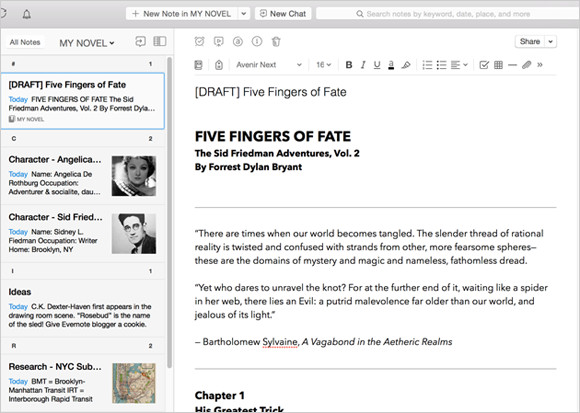
    Screenshot courtesy of www.Evernote.com

    If you’re a writer, whether it’s creative or business, you know that the bulk of a writing task is doing research and/or making notes. When you sit down to compile that research and start your writing, it helps to have those notes, web clippings, photos, etc. organized.

    Having a good organization system for your writing can help so much with getting inspired, getting started, and saving time.

    I suggest using Evernote for this. (You can read my blog post on Evernote here: Use Evernote For a New Level of Organization).

    There are multiple ways to use Evernote to organize your research. You can start with a notebook for “Research” with tags for each type of research. This is helpful if you won’t know the structure of your writing ahead of time. If you do have some structure in mind, it may be more helpful for you to have notebook stacks. For example, you could have a stack for each chapter, or a stack for each article.

    Use the Evernote app on your computer and mobile devices to write up your notes. You can add web clippings using the Evernote “Web Clipper” add-on in your internet browser and use the Evernote app on your smartphone or tablet to take photos.

    Tags can be very helpful to search for all of your research on a particular subject.

    You can assign multiple tags to each note, web clipping, or photo. For example, if you’re writing a piece about wellness and you find a web site dedicated to healthy eating, you can clip it and tag it “wellness”, “eating”, “diet”, etc.

    Using Evernote for research gives you a tool to keep all of your research in one place. Evernote’s great search tool can help you to bring up references quickly so that the most tedious part of writing goes quickly and smoothly, leaving you more time for creativity and even more research!

    Are you a fiction writer? Here’s a great article on Lifehacker: How to Use Evernote for Writing Fiction.

    Need help with Evernote? Contact me.