Tag: project

  • Here Are Five Important Questions to Ask After a Completed Project

    Here Are Five Important Questions to Ask After a Completed Project

    A completed project review is called a postmortem

    A project postmortem is a completed project review session.

    A postmortem is essential to make sure that you’ve learned something from the process. And if you’re worked with others on your project, the postmortem is a great forum for knowledge sharing.

    The Dictionary of Corporate Bullshit defines the postmortem as:

     1. “a meeting held following the conclusion of a project to discuss its strengths and weaknesses 2. “billed as a constructive forum geared toward improving a process but really a meeting in which everyone sits around trying to blame someone else for anything that went wrong…”

    Unfortunately, the second is too often true. You can read here about how to hold a successful postmortem: How to Do a Post-Project Review.

    So what do you do with what you’ve learned from your completed project?

    Ideally, you will be adjusting your process for the project. Here are some things that you can examine: (You can review my post on project management here: How to Stay on Top of Your Project Management).

    1. Did your project meet expectations? How would adjust those expectations next time?
    2. Did you miss any tasks that should have been done?
    3. How were your task estimates?
      • If too optimistic, how will better estimate next time? Build in more buffer? Add more resources? Improve productivity?
      • If too generous, can you commit to an earlier deadline next time?
    4. How were your communications? Were they any surprises? Any negative feedback?
    5. How happy were you and/or your team with the project?

    That last question may be the most important one. This article explains how emotions are crucial to successful projects: Run a Successful Project.

    The SanDisk Rolling Stones card was a project that failedIn my corporate career, I worked on many projects that failed because of unrealistic expectations and/or poor estimating. This resulted in missed deadlines and missing the market window. You probably don’t remember this product that I worked on: SanDisk Rolling Stones Card. I still keep this one on my desk to remind me of good ideas poorly executed.

    The important lesson from a completed project is always to learn from your mistakes.

    Get the “Controlling the Chaos” Newsletter and receive a free PDF download
    “Drowning in Email – A Lifeline for Communications Overload”

    * indicates required


  • How to Stay on Target with Your Goals

    How to Stay on Target with Your Goals

    Task Manager for Your Goals

    What is productivity?

    Productivity means performing on target according to your goals and deadlines. Let’s say your goal is to create a social media presence and have twenty followers. You’ll need to set a deadline to achieve that goal, break it down into achievable tasks, and assign a due date for each task.

    If you’re working unproductively, you won’t meet your goals by the deadline. This results in missed opportunities, loss of income, and perhaps a drop in confidence.

    There are many reasons for missing your deadlines, including unexpected obstacles, distractions, and unproductive employees. But you can mitigate the risk by making sure that you have good productivity tools in place.

    Start by setting up your system.

    You need:

    • Task management or project management software
    • Documented goals and deadlines
    • Activity sets for each goal
    • Due dates for each task with reminders

     
    Wunderlist goals and tasks manager


    Here’s my blog post on my preferred task manager called Wunderlist: Task Management for the Super Efficient. For project management, I like Insightly for ease of use, others prefer Asana or Basecamp.

    The next step after setting up your system is to determine your best method for working productively on a single task.

    This includes considering your work layout and your most productive time of day. Also consider limiting distractions during your work time by turning off notifications. Start by reading my blog post here about “perceived” productivity: How to Remain Productive.

    One productivity method is “Getting Things Done”. I’ve mentioned this in previous blog posts. Here’s a post about this and other methods for productivity: The Busy Human’s Guide to the Best Productivity Systems.

    As you’re working toward your goals, you will not only have to deal with distractions, you will also have to deal with shifting priorities.

    Let’s say, for example, that after reaching 10 followers on social media, all 10 are requesting a consultation or more information. These are new tasks that you have to integrate into your system.

    Do the following at least weekly:

    • Review your deadlines
    • Analyze your productivity and the factors affecting it
    • make adjustments


    Gantt Chart for Goals
     
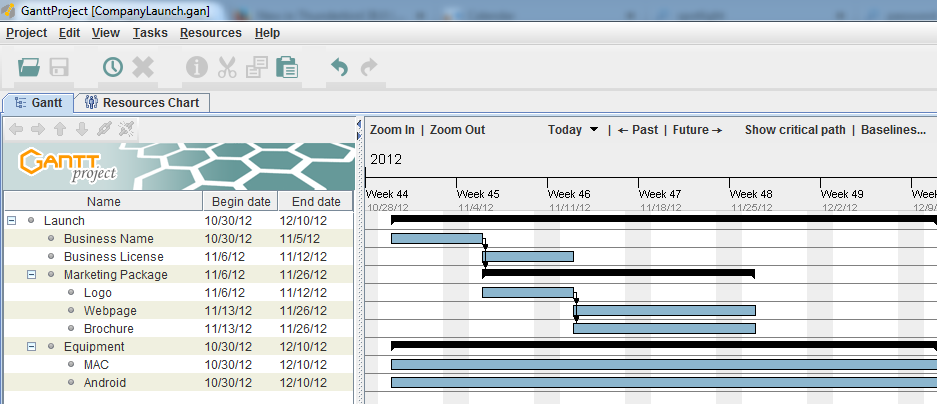
    The white board is the traditional system for making a visual representation of a project. As we moved into digital tools for project management, the Gantt chart (a type of bar chart) became popular. It was sometimes printed out and displayed to show the project progress.

    These days, these methods have been replaced with methods that recognize the shifting priorities of projects.

    Teams have daily meetings run by project managers. They move post-it notes around that represent tasks.

    Trello goals and tasks management

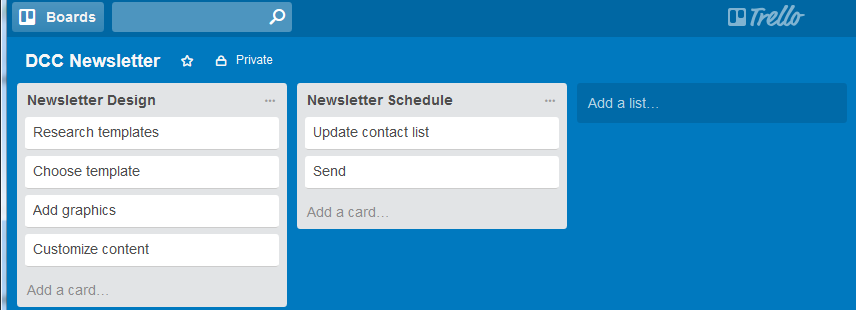
    There are now project management tools that use a more visual method. One example is Trello. Trello implements something called a “Kaban” board. It puts your task cards into columns so that you can arrange your tasks by lists.

    An example might be: Column one: “This week”, Column two: “Today”, Column three: “Done”. You can easily move task cards between columns.

    Whatever your working style is, once you’ve got the right systems and the right tools in place, you’ll be able to reach your goals consistently.

    Get the “Controlling the Chaos” Newsletter and receive a free PDF download
    “Drowning in Email – A Lifeline for Communications Overload”
    * indicates required