Category: Social Networking

  • Internet Safety: How to Connect with the World and Still Feel Safe


    Most of us do a lot of reading on social media. We read news on Twitter, we follow celebrities and politicians (want ideas on who to follow? Here’s a list of some of the most-followed on Twitter), we see trends and updates from friends in our Facebook newsfeeds.

    We can be passive readers, or we can be actively engaging by liking, commenting, and sharing. It’s more fun to engage, and it helps us to build our global community.

    But what about Internet safety?

    It seems like the trolls are everywhere these days. There is a risk that, if you put yourself out there, then you are subject to trolling. (If you’d like to read more about trolling, then try this article: What is Internet Trolling?)

    It’s tempting to stay safe, stop engaging, and shut the door on the trolls.

    But is there another way? Can you continue to engage on social media and still have Internet safety? I believe that you can, but you have to develop some toughness.

    The typical advice is “don’t feed the trolls”. This means to ignore them. Don’t respond to them and don’t let it bother you.

    I don’t know about you, but, although I think it’s good advice, I’m a little uncomfortable with it.

    When I was in Kindergarten, a little girl assigned to sit next to me liked to pinch me on the arm. My mother told me to ignore her and she’ll stop. I still remember how uncomfortable I was to follow my mother’s advice, ignore her, and not stand up for myself.

    Kids these days are not told to ignore bullies. Instead, the experts encourage us to encourage them to report bullies. Perhaps we should do the same with trolls, but the problem is that they’re just so prolific. We’re busy people and we can’t report every troll. Who would we report to anyway?

    The other option would be to engage with trolls.

    That is, to stand up for ourselves or for others, and shut the trolls down with our logic, reasonableness, empathy, and morality. According to the Dangerous Speech Project, it can be possible to reason with trolls: Considerations for Sucessful Counterspeak.

    If you’d still like to engage on social media but you’re concerned about Internet safety, here are some other options:

    • On a personal Facebook profile, you can choose who sees your posts. Read here to learn more: Choose Your Favorite Facebook Friends.
    • If you have a Facebook business page, check your settings. You can limit your audience, block certain words, and turn on a profanity filter.
    • Don’t read comments.
    • Block offensive followers.
    • Don’t invite feedback by asking open questions.

    I invite your engagement! Please like, comment, or share.

    SUBSCRIBE TO MY NEWSLETTER

    Get the “Controlling the Chaos” Newsletter and receive a free PDF download
    “Drowning in Email – A Lifeline for Communications Overload”
    * indicates required


  • Social Media Engagement – What does it mean for Your Business?

    Social Media Engagement – What does it mean for Your Business?

    Social Media Engagement

    Are you not getting the level of social media engagement that you’d like to see?

    You’ve gone through the trouble of create a Facebook business page (if not, read this: How to Create a Facebook Business Page). You’re trying to post to it regularly, but to what end?

    Perhaps you’ve been told to post twice/day to increase social media engagement. That’s a hard standard to keep up. Is it really necessary? Should you be focusing on more likes? Engagements? Or clicks through to your web page?

    It’s hard to get people to engage with your Facebook posts.

    We’re all inundated on our news feeds, we have limited time, and some people are wary of engaging on the Internet. If you’re posting on Instagram (read here: Use Instagram), you may be having better luck. Your audience is likely younger and more accustomed to social media engagement.

    You may have been told to pay to boost your posts to reach a broader audience. This is good advice if your goal is to increase brand awareness.

    Traditional advertisers have always focused more on brand awareness than on social media engagement.

    The more you see something advertised, the more likely you are to remember it when you need it. But think about it – when you see an interesting advertisement, do you go and follow that brand? Do you comment on it? Do you buy right away?

    Chances are that you don’t. Social media engagement is good, because it increases your reach, but it’s hard to achieve. Organic reach (which means unpaid distribution) on Facebook has gotten abysmally low.

    You should think of your social media as a marketing and advertising expense with the goal of increasing brand awareness.

    If you have the budget, hire someone to post content regularly. Boost a post once/week to increase your reach and brand awareness.

    Engagement is also useful for testing your content. Keep track of which content gets more engagement. Re-use some of your best content and boost it.

    Social media marketing is a long-term strategy. So don’t get hung up on likes or engagements. You’re in this for the long haul.

    Tips on boosting a post:

    • Boost a post that has an interesting visual. This could be a link. Be sure that the visual doesn’t have too much text on it.
    • Experiment with budget. Start small, monitor reach and engagement.
    • Consider a “sharing contest”. Encourage your followers to share for a chance at a prize.

    Wondering about Facebook Ads vs. boosting? Read this: Here’s a Quick Guide to Driving Social Engagement.

    Here’s some more advice: 6 Things Business Owners Need to Understand.

    SUBSCRIBE TO MY NEWSLETTER

    Get the “Controlling the Chaos” Newsletter and receive a free PDF download
    “Drowning in Email – A Lifeline for Communications Overload”
    * indicates required


  • Here’s a Quick Guide to Driving Social Engagement Using Facebook Ads

    Here’s a Quick Guide to Driving Social Engagement Using Facebook Ads

    Facebook Ads can help your reach

    Do you have a Facebook business page? (If not, and you’d like to, read my blog post here: How to Create a Facebook Business Page.)

    If you do have a Facebook business page, you may find you’re not getting enough engagement, and your “reach”, or the number of followers who see your posts, is in the single digits. So it may be time for paid Facebook ads.

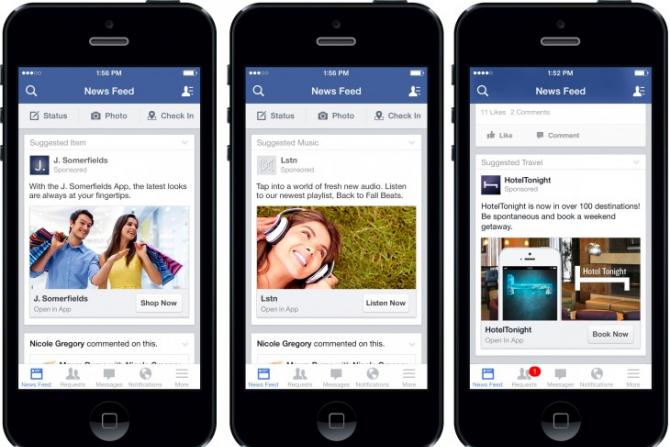
    There are basically two ways to increase your reach on Facebook. The first is to pay to “boost” a post. The other is to create Facebook ads. Both methods will display in the newsfeed of your targeted audience.

    Boosting a Facebook post is easy and can be inexpensive.

    Just create the post and then click on “Boost Post”. You’ll be able to select an audience target, a maximum budget, and duration. Try it out with different options and see how well it works for your business.

    Creating Facebook ads is more complex but can get better results.

    You’ll need a good graphic with a small amount of copy on it (Facebook limits how much copy you can have on an image), copy text, and text for a headline. Below is one that I created:

    Facebook Ads can help your reachHere are the Facebook criteria for ads:

    • Recommended image size: 1,200 x 628 pixels
    • Image ratio: 1.9:1
    • Text: 90 characters
    • Headline: 25 characters
    • Link description: 30 characters
    • Your image should include minimal text.

    Then go to this link: https://www.facebook.com/ads/manager/creation. Decide if your objective is to get more likes on your Facebook page or to send people to your website. You can get more insight on strategy at this article: What $5 per Day Will Buy You.

    Creating a Facebook ad over a boosted post gives you access to more demographics – to a specific industry, for example, or to a specific gender, interests, location, or household income.

    Here’s an article with more detail on boosting and creating ads: Boosting Vs Ads.

    SUBSCRIBE TO MY NEWSLETTER

    Get the “Controlling the Chaos” Newsletter and receive a free PDF download
    “Drowning in Email – A Lifeline for Communications Overload”

    * indicates required


  • How to Create a Facebook Business Page and Gain New Followers

    How to Create a Facebook Business Page and Gain New Followers

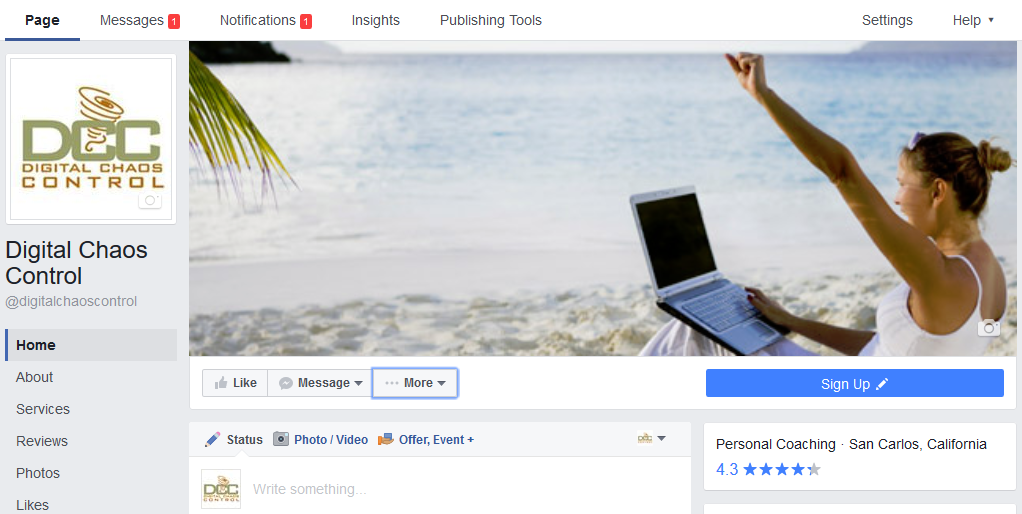
    Digital Chaos Control Facebook Business Page

    Should you have a Facebook business page?

    Facebook now has 2 billion active users. So, yes, you should have a Facebook business page.

    The problem has always been how to reach those users through your page. The old advice of posting consistently to show up on your follower’s news feeds seems to be dated now. According to this article, there’s no point in having a business page unless you’re going to pay to boost your posts: R.I.P Organic Reach on Facebook.

    Boosting a post can be inexpensive – you set the budget that you want to pay. And you can target your demographic.

    Start by creating your Facebook business page from your personal account.

    You can find “Create Page” under the down arrow at the top right of the toolbar. You’ll have to choose a category. Most businesses will fall under the “Company or Organization” category unless you have a brick & mortar storefront.

    Once you’ve created your business page, you can add your logo or head shot as a profile photo, an image of your business or profession as a cover photo, and fill in additional information about your business.

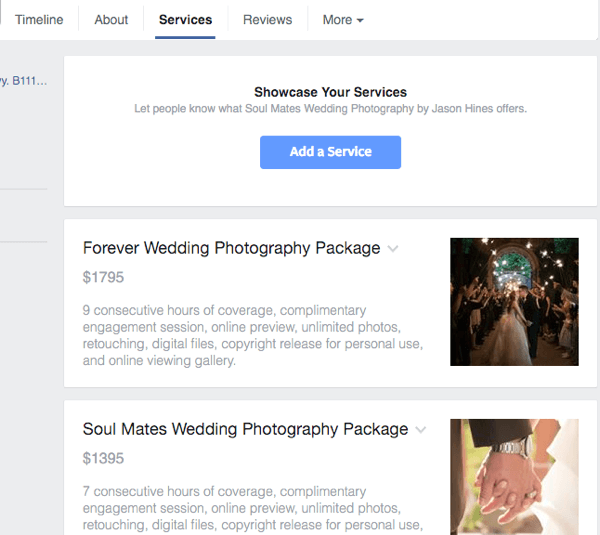
    Facebook now allows you to list services on your business page:

    “… the new Services section enables professional services businesses to showcase a list of their offerings at the top of their Page. So now, for example, a spa can add their services menu to their Page or highlight the line of products they sell, helping people get to know their business faster. And understanding the services and products a business offers is key to deciding to work with that business.”

    Facebook business page services

    Once you’ve completed your business page, here are the next steps:

    1. Invite people to like your page. Under “More”, select “Invite Friends”.
    2. Post consistently and try to use content that will engage your followers. Photos or links are a must. The more followers you get, the lower “reach” percentage you’ll get. As you get the hang of posting, you should consider paying to boost.
    3. Use hashtags in your posts so that people searching for those terms will find your page.
    4. Keep an eye on your insights and learn from the posts that get the most engagement.

    Here’s an article with more detail: How to Create a Facebook Business Page.

    SUBSCRIBE TO MY NEWSLETTER

    Get the “Controlling the Chaos” Newsletter and receive a free PDF download
    “Drowning in Email – A Lifeline for Communications Overload”
    * indicates required


  • Missing Out? Here’s a list of some of the most-followed on Twitter.

    Missing Out? Here’s a list of some of the most-followed on Twitter.

    Most-followed on Twitter

    Should you be paying attention to the most-followed on Twitter?

    Some people use Twitter to connect with family and friends, but for most us, that’s not the case. We’re more likely to use Facebook or Instagram for that.

    Most people use Twitter instead to get news, follow sports, follow celebrities, and follow brands. Most people don’t themselves do any “tweeting”.

    Celebrities like Justin Bieber and Katy Perry are among the most popular on Twitter. The most popular on Twitter for news sites are CNN, CNN Breaking news, SportsCenter, The New York Times, BBC News, BBC Breaking News, and the Economist.

    Barak Obama and Bill Gates are the most popular on Twitter for non-entertainment celebrities. Most popular Twitter organizations (non-sports) include NASA and TED Talks. Most popular Twitter companies are YouTube, Twitter itself, Instagram, Vine, Google, and Facebook.

    Here are some interesting sites and people to follow, by category:

    Some of the Most-Followed on Twitter for Tech:

    TechCrunch  – A San Francisco tech journal

    Wired  – An influential tech magazine

    Macworld  – An influential tech magazine focused on Apple products

    GeekPolice – A software company with funny, topical tweets

    Guardian Tech  – Tech news from London’s The Guardian

    Guy Kawasaki – Influential tech investor and former Apple evangelist

    Farhad Manjoo  – New York Time technology writer

    Aaron Levie – Tech CEO and tech humorist

    Some of the Most-Followed on Twitter for Politics:

    Donald Trump, of course. Anderson Cooper, Jake Tapper, and Christiane Amanpour from CNN

    The Heritage Foundation – Conservative think tank

    Institute for Policy Studies  – Liberal think tank

    Some of the Most-Followed Writers/Publications:

    Kendra Alvey – Freelance writer

    Neil Gaiman – Author

    Joanne Harris – British author

    New Yorker  – Influential publication

    Most-Followed on Twitter for Fashion:

    Chanel

    Most-Followed on Twitter for Photography:

    Earth Pics

    History in Pictures

    LIFE Magazine

    One of the Most-Followed Artists:

    Olafur Eliasson


    SUBSCRIBE TO MY NEWSLETTER

    Get the “Controlling the Chaos” Newsletter and receive a free PDF download
    “Drowning in Email – A Lifeline for Communications Overload”
    * indicates required


  • Use Instagram to Engage with Your Family, Friends, and/or Followers

    Use Instagram to Engage with Your Family, Friends, and/or Followers

    Have you ever tried Instagram?

    Instagram is an iOS or Android app for sharing photos and videos with “followers”. Those can be your Instagram followers or you can instantly post to Facebook, Flickr, Twitter, or Tumblr.

    Instagram has filters that you can use to change and improve the look of your photos.

    When you take a photo using the app, you’ll have a choice of filters to use. Here are some popular filters:

    • The most popular is “Clarendon” which brightens, highlights, and intensifies shadows for color that pops.
    • The “Gingham” filter is the opposite, giving you more an old-fashioned muted look.
    • The “Juno” filter brightens and warms while still looking authentic.
    • “X-Pro II” adds a vignette effect.
    • Valencia” warms without fading.

     Here’s a photo shot in Bolinas, CA.

    Here’s the photo using the “lo-fi” high-contrast filter.

    Here it is using the “Kelvin” filter. It adds a warm tone.


    Most users are under 35. If you have children or grandchildren, or you’d like to market to that age group, you should check it out.

    Instagram is owned by Facebook and is also supported by advertising. Engagement rates for Instagram advertising are similar to that of Facebook. If you’re already advertising on Facebook and you’re targeting the younger demographic, it makes sense to also advertise on Instagram.

     Without advertising, you can still gain followers by posting interesting photos.

    Be sure to use hashtags so that users can find you. Here’s a good article on Instagram engagement for beginners: Building Your Instagram Account

    Here’s how to get started: Getting Started.

    SUBSCRIBE TO MY NEWSLETTER

    Get the “Controlling the Chaos” Newsletter and receive a free PDF download
    “Drowning in Email – A Lifeline for Communications Overload”
    * indicates required


  • Choose Your Favorite Facebook Friends and Organize Everyone Else

    Choose Your Favorite Facebook Friends and Organize Everyone Else

    Facebook FriendsWhen I first started using Facebook, it was an exciting new way to connect with friends, especially friends whom I didn’t see very often.

    Over time, more and more people connected with me on Facebook – friends, co-workers, family, childhood acquaintances, other parents, etc. I found it easier to segment my news feed into Facebook friends lists so that I could view them separately and on my own schedule.

    The other advantage to keeping Facebook friends lists is that you can select one or more lists when you post. You can even select one list of Facebook friends to see your post while blocking someone on the list – to avoid offending that person, for example.

    See your Facebook friends lists by clicking on “Friend Lists” in your left sidebar. (In your mobile app, your lists are called “Feeds”. You can only create Facebook friends lists, or feeds, through your browser, not your mobile app.)

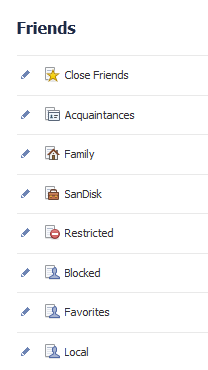
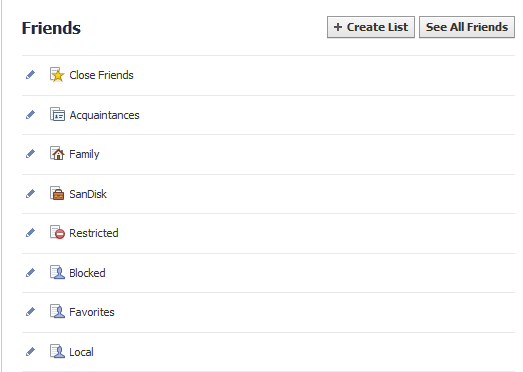
    Your default lists include a “Close Friends” list and an “Acquaintances” list. Adding friends to Close Friends tells Facebook that you want to see more from that person in your new feed. Adding friends to Acquaintances tells Facebook that you want to see less.Facebook Friends List

    Start by selecting these lists and adding friends. You can do this by typing names in the “+” box, or you can click on “See All” above “ON THIS LIST”, changing the drop down list from “On This List” to “Friends”, and then clicking on their photos.

    There are several friend lists that Facebook creates and automatically populates, such as “Family” and your current workplace. You don’t need to do anything to edit these lists unless you want to add people that Facebook missed.

    For your own custom list, click on “Create List.”

    Now when you click a Facebook friends list (or feed) you will only see the updates from your friends on that list.

    Here’s how to post just to certain lists:

    Sharing with Facebook Friends
    1. You can go to that list and share an update there. OR
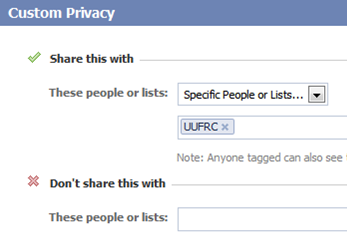
    2. From your home news feed, you can click on the drop down box and select your list. If you select “Custom”, you can share with a list and not share with some people on the list. You could put everyone in your current job on their own list for example, and share updates about your job search with all your friends except for those on that list.

    Need help with Facebook?

    Contact Me

  • How to Manage Those Social Media Notifications

    How to Manage Those Social Media Notifications

    Social Media NotificationsFacebook, LinkedIn, and other social networks have transformed our lives and businesses. They have opened up our worlds. They connect us with those whom we’ve lost touch with and they expand our networks of connections.

    Unfortunately, it comes at a cost. Expanding our connections and networks leads to more information and contributes to our digital chaos.

    One of the factors leading to digital chaos is the increase in emails.

    We are inundated with social media notifications.

    There are two ways to manage notifications:

    1. Reduce the number of notifications that you’re receiving. You can manage this through your social media settings:

      • Facebook:  Go to “Settings”, then “Notifications”
      • LinkedIn: Go to “Settings & Privacy” , “Communications”, “Email frequency”
      • Twitter:  Go to “Notifications” at the top.
    2.  

    3. Filter notifications in your email reader.

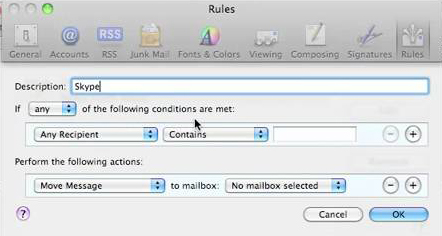
      • Apple Mail:
        • Create a new Mailbox called “Notifications”.
        • Go to “Preferences”, then “Rules”.
        • Create a new rule that moves your notification emails into your “Notifications” Mailbox.

         
        AppleMailRules

      •  

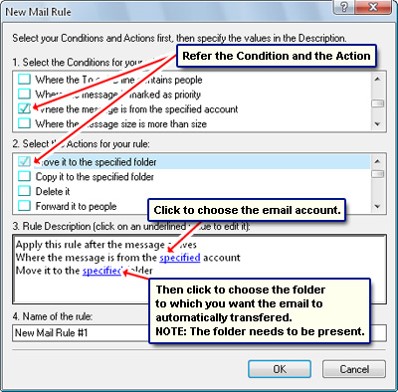
        OutlookRules

      • Outlook:
        • Create a new Folder called “Notifications”.
        • Right-click on a notification email. Select “Rules” and then “Always move messages from …”
        • Select the “Notifications” folder.


    Social media notifications serve a useful purpose, as most of us don’t have time to check our news feeds all the time.

    Make sure that you take the time to review your Notifications folder on a regular basis.

    SUBSCRIBE TO MY NEWSLETTER

    Get the “Controlling the Chaos” Newsletter and receive a free PDF download
    “Drowning in Email – A Lifeline for Communications Overload”
    * indicates required


  • What Everyone Ought to Know About Using LinkedIn to Stay in Touch

    What Everyone Ought to Know About Using LinkedIn to Stay in Touch

    LinkedIn is a social networking site for professionals. (You are a professional if you have or have ever had a job or a business.) There are several reasons why you should be using it, including:

    • Staying in touch with your former co-workers
    • Keeping up with professionals and companies that you’ve done business with
    • Joining groups related to your profession
    • Sharing updates related to your business
    • Keeping updated contact information

    You need to have a LinkedIn profile for anyone looking for your business/skill set or to re-connect with you.

    There may be old friends or co-workers, for example, looking for your contact information. Or there may be recruiters trying to fill a job position.
     
    If you’re a business owner, your profile can be the one to stand out, particularly if you have recommendations. It’s OK to ask for recommendations from your former co-workers, clients, and customers. It’s even better to give recommendations.


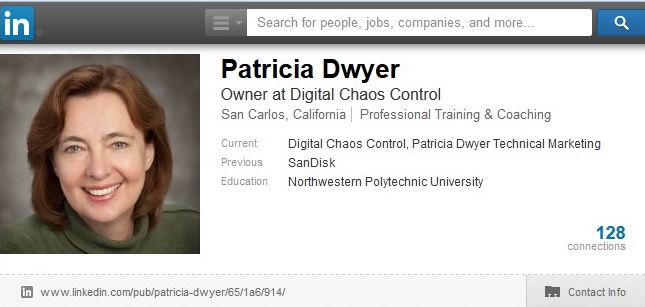
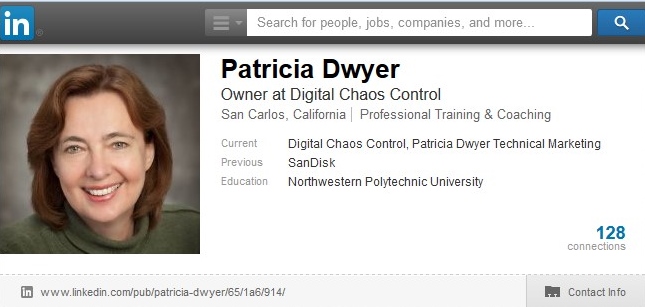
    LinkedInProfile

    Your LinkedIn profile should include:

    • A recent professional photo
    • A link to your website or blog
    • A summary of your experience or of your business 
    • Detail on your work & volunteer experience
    • A list of skills

    Once you have your profile set up, you should search for your connections and send a connection request. Make it a personalized request with a reminder of who you are / where you’ve met. Also search for groups affiliated with your industry or interests and join them.

    LinkedInNewsfeed

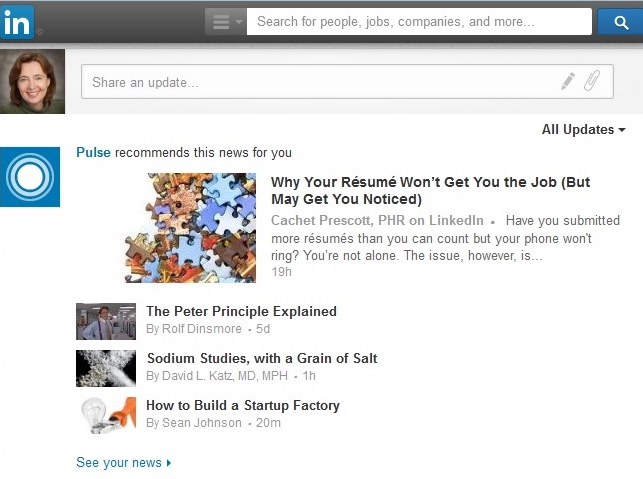
    LinkedIn will fill your news feed with a mix of profile updates, status updates, comments, and sponsored ads. It’s useful to read your news feed on a regular basis to see what’s happening with your contacts. You can make status updates too. Let your contacts know what’s new with you, your professional accomplishments, links to articles that you’ve liked, and links to your blog posts.


    Plan on doing LinkedIn status updates monthly, if not weekly.

    You can also “follow” companies in your industry to see their updates.

    SUBSCRIBE TO MY NEWSLETTER

    Get the “Controlling the Chaos” Newsletter and receive a free PDF download
    “Drowning in Email – A Lifeline for Communications Overload”
    * indicates required


  • Is Your Facebook News Feed Out of Control? Here are 3 Steps to Help.

    Is Your Facebook News Feed Out of Control? Here are 3 Steps to Help.

    facebookmessagingiconsWhen I first started using the Facebook news feed, it was an exciting new way to connect with friends, especially friends whom I didn’t see very often.

    Over time, more and more people connected with me on Facebook – friends, co-workers, family, childhood acquaintances, other parents, etc. Some people are completely quiet, some update occasionally, some update every day, and even multiple times per day.

    Even as it became more and more difficult to follow my quieter friends, I lost control of my Facebook news feed. Facebook decides what I see based on secret methods, but reputedly based partly on how often I connect with someone and how many likes and comments my friends receive.

    So I needed to learn how to take back control of my Facebook news feed, as much as the service allows me to.

    Here are some methods that I use:

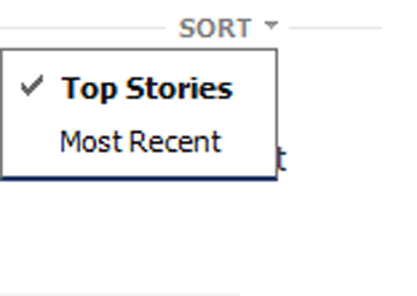
    1. Facebook news feed sortSort: This is really the only way to get around the Facebook controls. There are two ways to sort your Facebook news feed: “Top Stories”, which is the default, and “Most Recent”. You can find the Sort option by clicking on the arrow to your right of “News Feed” under “Favorites”.
       
      For the Facebook app, tap “More” (3 horizontal bars). On Android, scroll down to “Feeds”. In iOS, tap “See More” and scroll down to “Feeds”.
    2.  

    3. View your Facebook news feed using friend listsFriend Lists: If you sort your friends into lists, then you can view those lists separately. See your lists by clicking on “Friend Lists” in your left sidebar.
       

      • Facebook creates a “Close Friends” list and an “Acquaintances” list. Adding friends to these lists helps Facebook to know who to emphasize in your news feed.
      • There are several friend lists that Facebook creates and automatically populates, such as “Family” and your current workplace.
      • You can create your own custom lists. Select “Create List.”
         
        When you view a friend list, you will only see the updates from your friends on that list.
    4.  

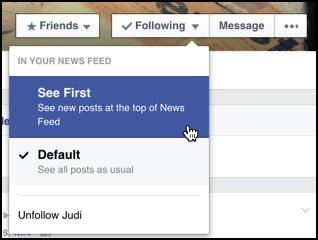
    5. facebook-see-first-newsfeed-4Controlling individuals: If you hover you cursor over an individual in your Facebook news feed, you’ll see some options. You can add that individual to a list, select “See First” to prioritize that person in your news feed, or “Unfollow”.
       
      On the Facebook app, tap on a friend’s name in your news feed to go to that person’s profile.

    SUBSCRIBE TO MY NEWSLETTER

    Get the “Controlling the Chaos” Newsletter and receive a free PDF download
    “Drowning in Email – A Lifeline for Communications Overload”
    * indicates required